
Madferret Software

Contact Form 7 Mailchimp Integration: Email Marketing Setup with ChimpFuse

Last Updated: March 12, 2026

  • Works with Contact Form 7
  • Uses official Mailchimp API
  • GPDR-friendly double opt-in
  • No custom code required
Hero illustration showing Email Marketing with Contact Form 7 and Mailchimp using the ChimpFuse plugin, with person sending email and setup guide call-to-action.
A practical guide to designing and implementing a scalable email marketing workflow using Contact Form 7 and Mailchimp - from strategy through to setup with ChimpFuse.

Email may be decades old, but it continues to outperform nearly every other marketing channel. It reaches your audience directly, it’s permission-based, and it gives you full control over your messaging without relying on complex algorithms. But building an effective email system requires more than just sending messages – it requires capturing high-quality data the moment someone interacts with your website.

That’s where Contact Form 7 + Mailchimp + ChimpFuse come together brilliantly. Most WordPress site owners rely heavily on forms, whether for enquiries, downloads, events, or newsletter sign-ups. But unless that data flows automatically into Mailchimp, you end up managing spreadsheets, copying and pasting emails, or manually tagging subscribers. Not only is this inefficient – it increases the risk of human error and makes compliance more difficult.

This pillar article explains:

  • why email marketing still performs so well in 2025/26,
  • how tags and segmentation can dramatically increase your campaign performance,
  • why CF7 is an ideal starting point for capturing email sign-ups, and
  • how to connect everything through ChimpFuse without writing a single line of code.

If you’re new to marketing – don’t worry. This is written for people who understand technology but want clarity on strategy, best practices, and implementation.

Table of Contents

// Why Contact Form 7 Mailchimp Integration Still Works for Email Marketing

Email marketing succeeds because it is direct, personal, and predictable. Unlike social media platforms – where algorithms decide who sees your content – email allows you to send messages straight to your audience’s inbox. You own your list, you own your data, and you control how and when communication happens.

But beyond reach, the numbers speak for themselves. Industry reports consistently show email generates an ROI of £36–£42 per £1 spent, outperforming paid ads, organic social media, and virtually every otFlowchart illustrating integration between Contact Form 7, ChimpFuse plugin, and Mailchimp for seamless WordPress email automation.her digital channel. The reason is simple: people who subscribe to your list want to hear from you. They are already familiar with your brand, which means they are more responsive to updates, offers, resources, or invitations you send later.
This is also where double opt-in becomes important. When someone subscribes and then confirms their subscription through an email link, you achieve:

  • stronger consent (ideal for GDPR),
  • higher quality lists,
  • fewer spam complaints, and
  • improved deliverability.


If someone takes the extra step to confirm their email, they are much more likely to engage long-term.

To dive deeper into this topic, read: Why Double Opt-In Matters: GDPR and Email Marketing Best Practices

Email marketing succeeds because it is direct, personal, and predictable. Unlike social media platforms – where algorithms decide who sees your content – email allows you to send messages straight to your audience’s inbox. You own your list, you own your data, and you control how and when communication happens.

But beyond reach, the numbers speak for themselves. Industry reports consistently show email generates an ROI of £36–£42 per £1 spent, outperforming paid ads, organic social media, and virtually every other digital channel. The reason is simple: people who subscribe to your list want to hear from you. They are already familiar with your brand, which means they are more responsive to updates, offers, resources, or invitations you send later.

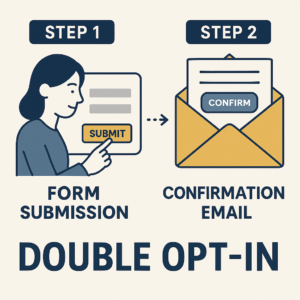
This is also where double opt-in becomes important. When someone subscribes and then confirms their subscription through an email link, you achieve:

  • stronger consent (ideal for GDPR),
  • higher quality lists,
  • fewer spam complaints, and
  • improved deliverability.


If someone takes the extra step to confirm their email, they are much more likely to engage long-term.

To dive deeper into this topic, read: Why Double Opt-In Matters: GDPR and Email Marketing Best Practices

Flowchart illustrating integration between Contact Form 7, ChimpFuse plugin, and Mailchimp for seamless WordPress email automation.

// Smarter Targeting with Tags and Segmentation

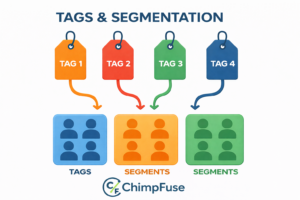
If email marketing is the engine, segmentation is the steering wheel. Sending every subscriber the same message is the fastest way to see open rates plummet. Today’s audiences expect personalised, meaningful communication – and that’s exactly what Mailchimp’s tagging system enables. In a Contact Form 7 Mailchimp setup, tagging at the point of submission is what turns a basic form into a scalable marketing system.

Tags let you label subscribers instantly based on how they signed up, what they selected, or why they interacted with your form. These tags then power dynamic segments inside Mailchimp so each subscriber receives content tailored to them.

Examples include:

  • “Event Attendee 2025”
  • “Priority Contact / VIP”
  • “Download: Mental Health Guide”
  • “Newsletter Weekly”
  • “CF7 Signup”

The magic happens when you connect CF7 with ChimpFuse – because ChimpFuse allows you to apply both static tags and dynamic tags (from form fields) at the exact moment a form is submitted.

This means:

  • No more manual tagging,
  • No duplicate audiences,
  • No guesswork when building email campaigns, and
  • High-quality segmentation from day one.

Read more: Mastering Mailchimp Tags & Segmentation for Smarter Campaigns

If email marketing is the engine, segmentation is the steering wheel. Sending every subscriber the same message is the fastest way to see open rates plummet. Today’s audiences expect personalised, meaningful communication – and that’s exactly what Mailchimp’s tagging system enables. In a Contact Form 7 Mailchimp setup, tagging at the point of submission is what turns a basic form into a scalable marketing system.

Tags let you label subscribers instantly based on how they signed up, what they selected, or why they interacted with your form. These tags then power dynamic segments inside Mailchimp so each subscriber receives content tailored to them.

Examples include:

  • “Event Attendee 2025”
  • “Priority Contact / VIP”
  • “Download: Mental Health Guide”
  • “Newsletter Weekly”
  • “CF7 Signup”

The magic happens when you connect CF7 with ChimpFuse – because ChimpFuse allows you to apply both static tags and dynamic tags (from form fields) at the exact moment a form is submitted.

This means:

  • No more manual tagging,
  • No duplicate audiences,
  • No guesswork when building email campaigns, and
  • High-quality segmentation from day one.

Read more: Mastering Mailchimp Tags & Segmentation for Smarter Campaigns

// Integrating Contact Form 7 with Marketing Tools Beyond Mailchimp

Once your forms are connected to Mailchimp, you’re not limited to basic newsletter sign-ups. CF7 can be integrated with a whole ecosystem of tools – CRMs, automation platforms, analytics dashboards, or course systems – making your website the central hub for data capture and communication.

Illustration showing double opt-in email marketing workflow with confirmation message — demonstrating GDPR-compliant subscriber engagement.

CF7 + ChimpFuse handles the Mailchimp sync, but from there you can expand your system into:

  • Zaps or webhooks connecting to CRMs like HubSpot or Pipedrive,
  • Tag-based automations in Mailchimp that trigger onboarding journeys,
  • Lead scoring systems that segment subscribers based on behaviour,
  • Event workflows that move subscribers into unique sequences.

This is why CF7 remains one of the most popular form plugins in the WordPress ecosystem – even without heavy no-code automation tools, it forms a stable foundation for marketing and lead capture.

Explore more in: The Ultimate Guide to Integrating Contact Form 7 with Marketing Tools

Once your forms are connected to Mailchimp, you’re not limited to basic newsletter sign-ups. CF7 can be integrated with a whole ecosystem of tools – CRMs, automation platforms, analytics dashboards, or course systems – making your website the central hub for data capture and communication.

CF7 + ChimpFuse handles the Mailchimp sync, but from there you can expand your system into:

  • Zaps or webhooks connecting to CRMs like HubSpot or Pipedrive,
  • Tag-based automations in Mailchimp that trigger onboarding journeys,
  • Lead scoring systems that segment subscribers based on behaviour,
  • Event workflows that move subscribers into unique sequences.

This is why CF7 remains one of the most popular form plugins in the WordPress ecosystem – even without heavy no-code automation tools, it forms a stable foundation for marketing and lead capture.

Explore more in: The Ultimate Guide to Integrating Contact Form 7 with Marketing Tools

Illustration showing double opt-in email marketing workflow with confirmation message — demonstrating GDPR-compliant subscriber engagement.

// Set It Up Yourself

Understanding the strategy is important – but implementing it should be simple. ChimpFuse has been designed to give you all the power of Mailchimp’s API with the zero-stress usability of WordPress. In practice, most Contact Form 7 Mailchimp integrations fail not because of Mailchimp, but because forms are not structured correctly at source.

Here’s the quick overview of how setup works:

  1. Install ChimpFuse on your WordPress site.
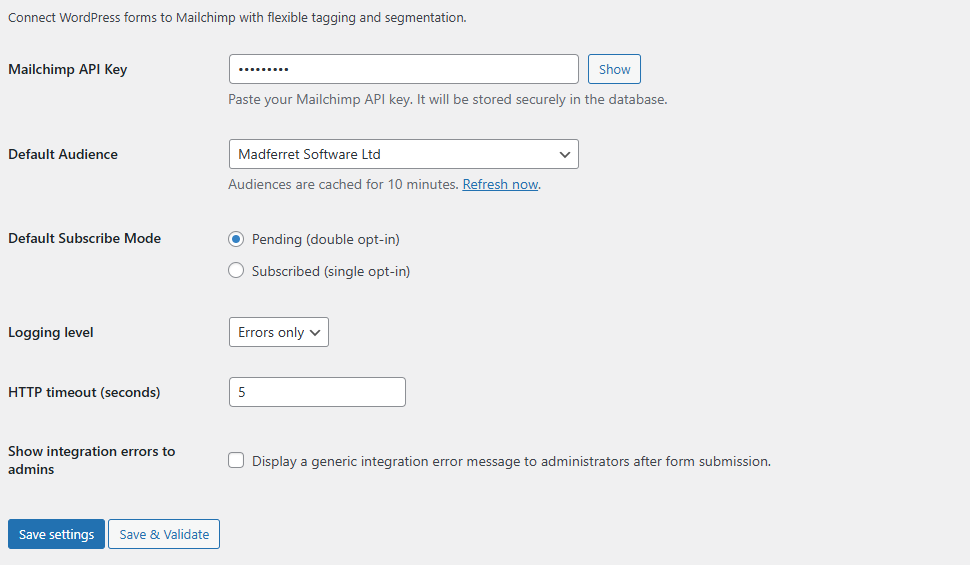
  2. Go to ChimpFuse → Settings, paste your Mailchimp API key, and select your default audience.
  3. Edit any Contact Form 7 form and enable “Mailchimp Integration”.
  4. Choose the Mailchimp audience for this specific form.
  5. Map your form fields to Mailchimp fields — Email is required; the rest are optional.
  6. Add static tags (e.g., website-signup) or dynamic tags based on form answers.
  7. Choose your subscription mode:
    1. Subscribed (immediate)
    2. Pending (double opt-in email sent to user)
  8. Optionally map a GDPR consent checkbox.
  9. Save the form, test it, and confirm that the subscriber appears in Mailchimp.

Understanding the strategy is important – but implementing it should be simple. ChimpFuse has been designed to give you all the power of Mailchimp’s API with the zero-stress usability of WordPress. In practice, most Contact Form 7 Mailchimp integrations fail not because of Mailchimp, but because forms are not structured correctly at source.

Here’s the quick overview of how setup works:

  1. Install ChimpFuse on your WordPress site.
  2. Go to ChimpFuse → Settings, paste your Mailchimp API key, and select your default audience.
  3. Edit any Contact Form 7 form and enable “Mailchimp Integration”.
  4. Choose the Mailchimp audience for this specific form.
  5. Map your form fields to Mailchimp fields — Email is required; the rest are optional.
  6. Add static tags (e.g., website-signup) or dynamic tags based on form answers.
  7. Choose your subscription mode:
    1. Subscribed (immediate)
    2. Pending (double opt-in email sent to user)
  8. Optionally map a GDPR consent checkbox.
  9. Save the form, test it, and confirm that the subscriber appears in Mailchimp.

// Key Takeaways

  • Email marketing is still the highest-ROI channel when executed well.
  • Double opt-in ensures GDPR compliance and better deliverability.
  • Tags and segmentation dramatically boost engagement and campaign relevance.
  • CF7 + ChimpFuse gives you a powerful, automated Mailchimp workflow.
  • Your website becomes a complete subscriber engine with zero manual admin.

// FAQs

Ready to connect your forms to Mailchimp?

Ready to collaborate?

Tell us a bit about your project below – if it’s a good fit, we’ll schedule a quick chat to explore it further.

Want early access?

We’re currently rebuilding the Member Portal with new features.

Enter your email to be the first to know when it launches.

Join the Early Access List

Be among the first to explore our latest WordPress plugins and apps.

Sign up to receive early access invites and feature updates directly to your inbox.